Anvil
NOMINEE OVERVIEW
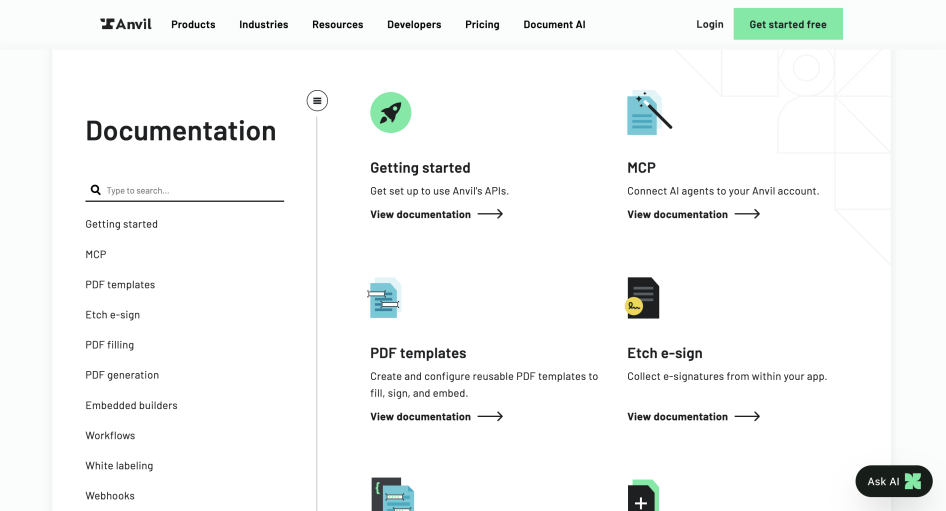
Anvil's developer documentation covers our APIs for PDF templates, PDF filling, PDF generation, e-signatures (we call ours Etch), Workflows, embedded builders, white labeling, and webhooks. Each of those has its own guide with its own quick start, its own objects, and its own webhook events. Underneath them all is one shared GraphQL reference.
From the portal you can:
- Get a free development API key and fill or sign a real document the same afternoon. Test runs are free and come back watermarked.
- Start from a one-page quick start in JavaScript, TypeScript, Python, or C#, from our Postman collection, or by cloning an example app that already runs.
- Connect an AI coding agent to your Anvil account through our hosted MCP server and generate a document before writing any code yourself.
- Read any docs page as Markdown. We publish an llms.txt and a page written for AI assistants.
NOMINATION RATIONALE
1) BEST REIMAGINED ONBOARDING EXPERIENCE IN A DEVELOPER PORTAL
Why is this category a strong match?
Onboarding onto a paperwork API is harder than it sounds, because a 200 response does not mean you are finished. You are finished when the document comes out right. For a long time that meant a developer had to understand our template model, tag fields on a PDF, learn our field types, and wire up a client before anything useful happened.
There are now two ways in. The usual one: every account gets a development key next to its production key, test runs are free and watermarked, and there are one-page quick starts for JavaScript, TypeScript, Python, and C#, plus a Postman collection and an examples repo covering five languages.
The other one is for people already working inside an AI coding tool. You point the agent at our hosted MCP server, sign in through the browser, and ask it to fill a PDF. You have a real document before you have read any documentation.
In what ways does the portal shine in this category?
MCP is the second item in our docs sidebar, ahead of every product guide. That page covers the hosted server at mcp.useanvil.com, OAuth sign-in through the browser, the six tools it exposes (fill_pdf, generate_pdf, graphql_query, graphql_schema, list_organizations, select_organization), and setup for nine clients including Claude, ChatGPT, Cursor, Copilot, Windsurf, Cline, and Zed, with a fallback for anything not on that list. No API key gets pasted into a config file anywhere in that flow.
Every docs page is also published as Markdown at a .md URL and listed in llms.txt at the site root. We keep a page called ai-info.md that tells AI assistants what Anvil does, who uses it, and which facts to cite, because plenty of developers now ask a chatbot about us before they ever load our site.
We publish plugins for agentic coding tools that scaffold working code for PDF filling, HTML to PDF, Etch, and Workflows into an existing Node or TypeScript project. The language quick starts offer that next to the normal npm instructions.
Development keys and test mode are separate controls and both are free. Test output is watermarked and test signatures come out red, so nobody ships a test document by accident and nobody has to be careful while learning.
Rate limits, 429 handling with Retry-After, usage headers, request size limits, and payload encryption are documented in the getting started path instead of turning into support tickets later.
2) BEST API PRODUCT MICROPORTAL INSIDE A DEVELOPER PORTAL
Why is this category a strong match?
Anvil sells a fairly broad paperwork platform, but our e-signature API, Etch, gets bought on its own. The people who buy Etch usually have their document process working already and just need signing to happen inside their own app, with their own branding. Many of them are moving off DocuSign or Dropbox Sign. They evaluate Etch on different terms than someone shopping for our PDF or Workflow APIs, and they are often on a deadline.
So we treat Etch as its own module in the portal rather than one section of a platform reference. It has a product page for the commercial questions, its own quick start, its own objects and webhook events, its own React components, its own theming, a hosted demo you can actually sign, and a documented path for migrating off a competitor. You can get Etch working in your app without reading anything about the rest of our API.
In what ways does the portal shine in this category?
The Etch guide runs about forty sections and acts as the module's own menu: quick start, embedded signers, iframe embedding, React components, iframe events, interactive signing, progressive signing, signer emails, error handling, webhooks.
Quick start is the first section on the page. It is a Node script you can run. Paste your API key and you have a real signable packet. Test packets are free, watermarked, and signed in red, so developers can evaluate Etch properly before talking to anyone here.
There is a live demo at esign-demo.useanvil.com that you can sign yourself. The app behind it is public on GitHub, so you can clone the thing you just used.
Etch has its own SDK surface. Two React packages, AnvilEmbedFrame and AnvilSignatureModal, handle embedding and a mobile signing modal. There are prebuilt themes in a public repo and a set of CSS variables for matching your own styles.
The objects are documented on their own page: EtchPacket, EtchSigner, EtchFillData, EtchUpload, SignerField. Two webhook events, signerComplete and etchPacketComplete, tell your app when signing is finished.
We also publish an open source migration plugin that takes a team from Dropbox Sign or HelloSign to Etch. It covers finding what you have, mapping the APIs, moving templates, rewriting the code, and checking the result.