Dynatrace
NOMINEE OVERVIEW
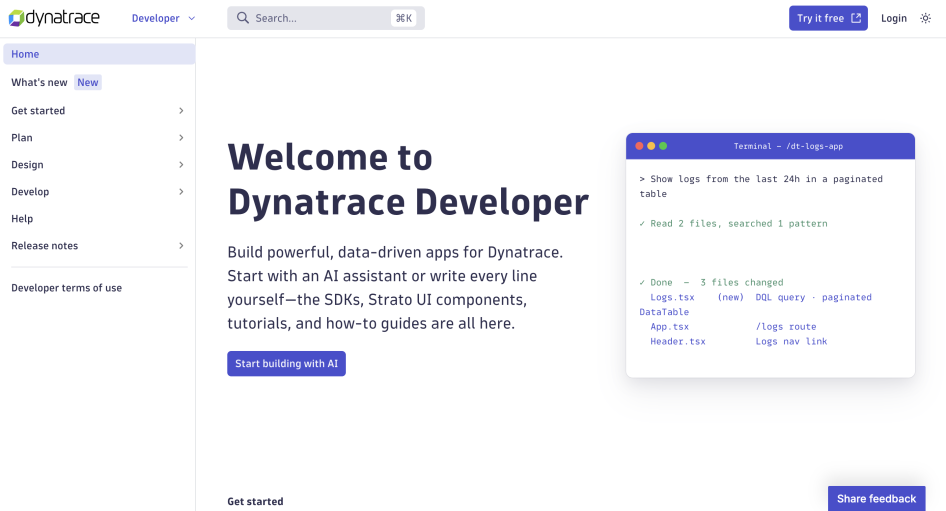
Dynatrace Developer is the documentation and reference hub for engineers and designers building custom Dynatrace Apps. The portal covers the full development cycle: a 5-minute quickstart with a video companion, the Strato Design System for building polished UIs, and TypeScript SDKs that expose Dynatrace platform capabilities as typed packages. As of 2026, the portal also documents how to use an integrated MCP server with AI assistance, such as Claude Code, to generate working app code from natural-language prompts. It serves Dynatrace engineers, enterprise customers, and ISV partners from a single URL with no audience-specific forks.
NOMINATION RATIONALE
1) BEST UNIFIED OR FEDERATED ENTERPRISE DEVELOPER PORTAL
Why is this category a strong match?
Building a Dynatrace App requires coordinating many moving parts: the AppEngine React/TypeScript runtime, a serverless function layer, 25+ TypeScript SDK packages (each wrapping a different platform API, including Davis AI, Grail DQL, IAM, Automation, SLOs, and Synthetic monitoring), the Strato Design System component library, the App Toolkit CLI, EdgeConnect for on-premises integrations, and a Workflows layer. On top of that, the portal serves two distinct builder profiles who approach the same product from opposite directions: developers working API-first through the SDK and function layers, and designers or UI-focused builders working component-first through the Strato Design System. Dynatrace Developer documents all of this under one roof, with a navigation structure that follows the builder's work.
In what ways does your portal shine in this category?
- Navigation follows the builder's cycle: Plan, Design, Develop, Help, Release Notes. Builders always know which section they need based on where they are in a project, not which internal team owns the content.
- "Design" is a top-level nav item, not a sub-page of "Develop". That reflects a deliberate decision to treat designers and UI-focused builders as primary, rather than a secondary audience whose content is buried in developer docs.
- 25+ SDK reference packages, each with the same page structure, so a developer who learns how to read the Automation SDK docs can read the IAM SDK docs without reorienting.
- A Tech Radar page gives builders explicit guidance on which technologies are stable, experimental, or deprecated, which matters when the underlying platform ships on a different cadence than the SDK packages.
- A "What's new" blog with regular updates keeps the overall picture coherent. Strato Design System ships every two weeks; AppEngine features ship independently; the blog surfaces noteworthy changes across all of them alongside the per-component changelogs.
- Three external audiences (enterprise customers, ISV partners, and independent developers) alongside internal Dynatrace engineers use the same portal without audience-specific forks, a deliberate content design choice rather than conditional rendering or separate portals.
2) BEST REIMAGINED ONBOARDING EXPERIENCE IN A DEVELOPER PORTAL
Why is this category a strong match?
Dynatrace Developer has been nominated in this category in 2024 and 2025 and has made concrete additions each year. The 2026 addition is documentation for AI-assisted app development. Developers can now follow the portal's guidance to set up a Dynatrace MCP server and use any AI assistant, for example Claude Code, to generate working Dynatrace app code from natural-language prompts, with correct Strato Design System components and performant data fetching with valid DQL queries on the first attempt.
The portal documents exactly how to write prompts that produce Dynatrace-specific code rather than generic React. Combined with the "First app in 5 minutes" quickstart, a full video tutorial series, and documentation for a VS Code/Cursor extension, the portal now describes four distinct paths to a first deployed app.
In what ways does your portal shine in this category?
- "First app in 5 minutes" quickstart: a single npx command creates a fully configured, deployed app skeleton. If the developer is already logged in, the environment URL is pre-filled and nothing needs to be copied from the browser.
- AI for app development (new 2026): dedicated documentation explaining how to pair any AI assistant, such as Claude Code, with the dt-app MCP server. In addition to the setup, the docs advise how to improve prompts so the model produces code that compiles and runs, not code that requires a dozen follow-up corrections.
- VS Code and Cursor extension: the portal documents an IDE extension so developers can build Dynatrace Apps and setting up their Dynatrace app development environment easily.
- Four distinct paths: read-and-code, watch-and-learn (video), AI-assisted, and IDE-native. A developer who avoids video tutorials and one who avoids reading both reach a working app without compromise.
- Strato Design System docs include live examples, so developers can see a rendered component and copy working code before writing a single line of their own.