Paddle
NOMINEE OVERVIEW
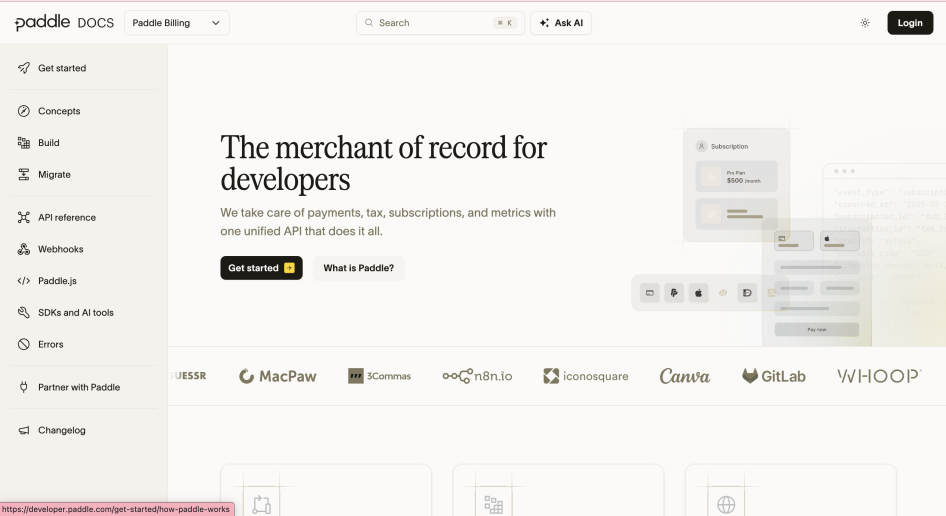
Paddle Developer Docs is the developer portal for Paddle, the merchant of record for SaaS, mobile app, AI, and digital product companies. Paddle handles payments, tax, subscriptions, compliance and fraud through one API, so developers can add billing to their product without building a finance and compliance operation.
NOMINATION RATIONALE
1) BEST REIMAGINED ONBOARDING EXPERIENCE IN A DEVELOPER PORTAL
Why is this category a strong match?
Onboarding no longer starts when a person lands on the portal. For a growing share of our users, it starts inside Claude Code, Lovable or ChatGPT, and the agent reads our 600+ page docs before the human does. Paddle had an extra problem of its own: we had documentation for two product generations, Paddle Classic and Paddle Billing, living side by side.
To cater to this, we rebuilt the portal and relaunched it as fully AI-native docs. We designed onboarding for two readers, the developer and the agent working beside them.
From a technology perspective, we moved from Next.js to Astro and spent a significant amount of time optimizing the core docs experience for speed and token efficiency. And of course, we separated Paddle Classic and Paddle Billing documentation to avoid agent confusion.
In what ways does the portal shine in this category?
For developers working with AI, we provide:
- Onboarding works inside AI tools. Plugins for Claude Code, Codex, and Cursor, plus one-click install options for IDEs, bring our docs directly into developer tooling.
- Every page is available as Markdown, alongside an llms.txt index, with a one-click option to open a page in AI tools. It also includes AI-generated summaries, our AI docs assistant, and easy access to our MCP servers and agent skills that encode our integration patterns for checkout, webhooks, pricing pages, subscription sync, sandbox testing and more.
- For a number of guides, we've added one-click prompts that let you copy the page context and a shaped prompt that you can paste directly into your AI assistant.
- We evaluate how well various LLMs fare with tasks in Paddle. Our public LLM benchmark tests how well various LLMs fare with tasks in Paddle. We assess 27 models on 10 integration tasks across three modes: baseline, with skills, and with our docs MCP. With our agent skills, the number of models passing the tasks increases dramatically. For example, only 10 of 27 models pass checkout in baseline mode, but with skills, this number goes up to 21 models.
The new docs score 100/100 on the afdocs spec and 75/100 on Cloudflare's isitagentready.com website.
Our docs are still written by humans, with human readers in mind. Alongside the AI features, there are a bunch of improvements for human readers of our docs, too:
- Our quickstart user journey takes a developer from sandbox signup to a localized pricing page, a test payment and real webhook payloads, using a no-setup webhook inbox, without ever doing any backend work. It then points to set-up and go-live checklists, and the webhook simulator lets teams test subscription events before taking real money.
- Each quickstart step ends with a “Not working?” section listing the failures we can actually see, and Ask AI answers only from our docs and public code. We’ve also extended our Kapa.ai-powered docs assistant with quick question prompts throughout the docs.
- Most pages now include a collapsible AI summary at the top, giving you a quick orientation before you dive in.
- New documentation boasts a massively improved Kapa.ai-powered docs assistant with quick question prompts throughout the docs, and an improved mobile experience.
- We’ve also added new content: a new Getting started section, with a focus on the most common tasks and workflows, and an expanded SDKs and tools section, with links to the official SDKs, sandbox, AI and MCP servers, specs, starter kits, and community libraries, a changelog with RSS feed, a Postman collection and a status page.
- We’ve entirely rebuilt our API reference section, with validation, min/max limits, default values, and more surfaced in a clean layout.
- We’ve also introduced a number of quality-of-life improvements that are often missed in developer documentation sites: ability to toggle between light and dark mode, an improved and more accurate search experience in the docs, and AI-powered suggestions on 404 result pages.
- As more developers hand the reading to an agent, we wanted to give them a reason to come back to the docs themselves. So the homepage now has working demos of four common tasks next to the code that produces it: opening a checkout, showing localized prices, upgrading a subscription and turning on payment methods.
- Users can now quickly copy install commands, sort data in tables, and compare features side-by-side with new components.
Every layout and component has been rebuilt to be more consistent and more readable, and make browsing our docs better. We have also audited against WCAG 2.1 AA at launch.